


FAQs
Categories
Sub-Categories
- (Q1.)What is "Request for 26A/27BA"?
- As per Notification No. 11/2016 and Notification No. 12/2016 a procedure for the purpose of furnishing and verification of Form 26A/27BA for removing default of Short Deduction/Collection and/or No Deduction/ Collection of Tax at Source is now introduced on the TRACES website.
In case if any Deductor/Collector has received "Short Deduction/ Collection", "Non-Deduction/Collection" demand notice, where the assesse has furnished his return of income under section 139 and has paid self-assessment tax / advance tax on his income then 26A/27BA is required to be submitted by Deductor. - Only registered user (Deductor) can avail this facility.
Note: For clearing Short Deduction/collection default present in the statement due to TDS payment deposited by deductee himself through challan 280, functionality is available from F.Y 2007-08 onwards.However, for clearing "Non-Deduction/Collection" default, functionality is available from F.Y 2016-17 onwards. This Request can only be raised on or after 1-Apr-2017. - Ans. 24Q & 26Q, 27EQ.
Note: In case of Form 27Q Request for 26A/27BA is applicable from F.Y 2019-20 w.e.f 1st Sep 2019. - Ans: Below are the transaction types for which Request for 26A/27BA can be submitted:
- Short Deduction/Collection
- Non-Deduction/Collection
- Short and Non-Deduction/Collection
- Ans: After login as a Deductor at TRACES website, Click on "Request for 26A/27BA" option available under "Statement/Payments" menu.
- Ans. Yes. However, if the If User is coming through Bank Website, then I-PIN window will open for entering I-PIN
- Ans: Steps involve for Request for 26A/27BA - Short Deduction/Collection Transactions are:
• Step 1: Login to TRACES website.
• Step 2: Click on "Request for 26A/27BA" tab available under "Statement/Payments" menu.
• Step 3: Select "Financial Year, Form Type and transaction type as Short Deduction/Collection" and proceed with the request for "Short Deduction/Collection transactions". (Digital Signature of authorized person is required to submit Request for 26A/27BA. If the User (Deductor)is coming through Bank Website then DSC is not required, I-PIN window will open for entering I-PIN.
• Step 4: After clicking on Proceed button request number will be generated and a message will pop up on the screen "You can check status of the request through 'Track request for 26A/27BA' under 'Statement/Payments' menu".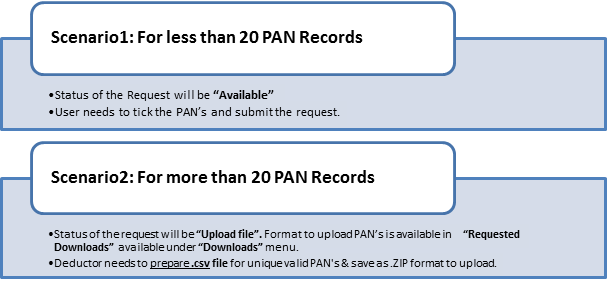
• Step 5: After ticking up the PAN, when user clicks on submit request 'Digital signature' window will open for validating Digital Signature of authorize person with the request. Final submission of request will be done after validating DSC. (Digital Signature of authorized person is required to submit Request for 26A/27BA. If the User (Deductor)is coming through Bank Website then DSC is not required, I-PIN window will open for entering I-PIN.
• Step 6: After Submitting the request a message will be provided to the Deductor. 'Request for Short Deduction /Collection transactions has been submitted'. Request number is <1223>. An e-mail and SMS will be sent to the Deductor for submission of the request.
• Step 7: Deductor can check status of the request through 'Track request for 26A/27BA' available under 'Statement/Payments' menu.
• Step 8: After submitting the Request on TRACES website, Short Deduction/Collection transactions will be provided to E-filing for further processing. - Ans: Steps are mentioned below:
• Step 1: Login to TRACES website as a Deductor.
• Step 2: Click on 'Request for 26A/27BA' tab available under 'Statement/Payments' menu
• Step 3: Select 'Financial Year, Form Type and Transaction type as Non-Deduction/Collection' and proceed with the request. (Digital Signature of authorized person is required to submit Request for 26A/27BA. If the User (Deductor)is coming through Bank Website then DSC is not required, I-PIN window will open for entering I-PIN.
• Step 4: After clicking on 'Proceed' button, a request number will be generated, and a message will be providing to Deductor which is: 'You can check status of the request through 'Track request for 26A/27BA' under 'Statement/Payments' menu
• Step 5: Status of the request will be 'Upload File' for uploading Non Deduction/Collection transactions..
• Step 6: Input File format to upload transactions is available in 'Requested Downloads' under 'Downloads' menu.
• Step 7: User will download the utility and input file format in 'Requested Downloads' section available under 'Downloads' menu.
• Step 8: User need to 'Add Non-Deduction/Collection transactions' in the file format suggested by TRACES and import that file in the utility.
• Step 9: Output file is generated which has to be uploading by clicking on 'Upload File' tab.
• Step 10: After clicking on 'Upload File tab' Digital Signature window will pop up for validating Digital Signature of the Authorize person and final submission of request will be done after validating DSC.
Or
If User (Deductor) is bank than I-PIN window will open for entering I-PIN.
• Step 11: After Submitting the request a message will appear on the screen 'Request for Non-deduction /Collection transactions has been submitted'. Request number will be generated <1223> and an e-mail and SMS will be sent to the Deductor for submission of the request.
Deductor can check status of the request through 'Track request for 26A/27BA' available under 'Statement/Payments' menu.
After submitting the 'Request for Non-Deduction /Collection' transactions will be sent to E-filing for further processing. - Ans. If the request status appears as 'Processed' then user (Deductor) needs to Contact Assessing Officer (AO) for Non-Deduction/Collection transaction, it will be taken care by the Assessing Officer only.
- Ans. Deductor will get error on screen 'You cannot raise request for the transaction type Non deduction/collection & Short and Non-deduction/collection prior to F.Y 2016-17'.
- Ans.Effect of this correction will reflect in the latest justification report.
- Ans: Reasons are as follows:
• Request status will be rejected if SD not available in the requested statement. Rejection remarks will be provided to user in the Remarks column.
• Request status will be rejected if uploaded file fails in the validations. Rejection remarks will be provided to user in the Remarks column.
• Request status will be rejected if there is error in uploaded file such as PAN is invalid.
• Rejection reasons will be provided to user in the download file available in 'Downloads' section in case of multiple rejections reasons. - Ans: Common Error messages will be:
• If Authorized person DSC is not registered then error message comes- 'Your DSC is not registered at TRACES. Kindly register your DSC at TRACES then place request for Short Deduction/Collection transactions'.
• If any request in under process and user is raising another request then error message comes- Your request for < Financial Year > and is under process. A new request can be raised when status is 'Processed/Not Available/Rejected/Processed with Partial Rejection/Processed with Rejection'. - Ans. User (Deductor) needs to close Short Deduction demand first by ticking PAN's Online (less than 20 PAN's) or upload input file offline (more than 20 PAN's) then only he will be allowed to rectify Non-Deduction /Collection defaults.
- Ans.Steps for checking the Sec Code list of 26A/27BA are:
Step 1: Deductor / Collector needs to open TRACES Website,
Step 2: There is an option of "Section Codes for 26A/27BA" available under "Quick Links" tab
Step 3: By clicking on "Section Codes for 26A/27BA" user will be redirected to list of "Section codes for Non-Deduction". User must mention the section codes for the columns of non-deduction file to ignore the rejections.Eg: Sample Transaction for Non-Deduction
PAN of Payee* (e.g., AAAAA1234A) Date of Payment or credited*
(dd-mmm-yyyy, e.g.,12-Dec-1980)Amount paid or credited* (e.g., 1000.00) Section under which tax was deductible* Amount of tax deductible* (e.g., 1000.00) Short/NonDeduction Amount*(e.g., 1000.00) Non Deduction Transaction under Section * AAAAA123AB 12/Nov/2016 10000 192 1000 1000 201(1) Eg: Sample Transaction for Non-Collection
PAN of Buyer* (e.g., AAAAA1234A) Date of Receipt or debit*
(dd-mmm-yyyy, e.g., 12-Dec-1980)Amount received or debited* (e.g., 1000.00) Section under which tax was collectible* Amount of tax collectible* (e.g., 1000.00) Short/Non Collection Amount*(e.g., 1000.00) AAAAA123AB 12/Nov/2016 10000 206CA 1000 1000 AAAAA123AC 12/Jan/2017 10000 206CB 1000 800 AAAAA123AD 12/Dec/2016 10000 206CC 1000 1000 - Ans. After login to TRACES as a Deductor, select 'Track Request for 26A/27BA' from 'Statements/Payments' menu. Deductor can track the request using three options:
• Request Number
• Date
• View. - Ans. On the below statuses, user can cancel the request for 26A/27BA:
Status Remarks Requested When user has initiated the request Available Request is accepted. Hyperlink provided on this status, clicking on which will take user to list of PAN screen Upload File User can upload file with PANs on which 26A/27BA has to be filed Submitted User has submitted the request to ITD. Sent to E-Filing Request data submitted by user has been sent to E-Filing
On 'Sent to E-Filing' status website will check whether response from E-filing has been received or not.
Scenario 1: Website will check whether response has been received or not.
Status - Under Cancellation Process
Remarks - Status will be updated after some time.
Scenario 2: If Response received from E-Filing then cancellation will be rejected.
Status - Processed
Remarks - Contact AO for Non Deduction/Collection & Cancellation Rejected due to response received from E-filing
Scenario 3: If no response received from E-Filing.
Status - Cancelled
Important Note:-If response received from E-Filing then status will be appeared as "Pending for Processing at TDSCPC" after "Under Cancellation Process" and the request got rejected in case of Transaction Type:-SD/SC and SD/SC and ND/NC both. - Ans. For Non deduction transaction only section 201(1) will be considered.
- Ans. The request which has been cancelled by the Deductor at TRACES may be showing at E'Filing portal in open stage. However, Deductor can raise a new request at TRACES if required.



